
Fast, reliable uploads, even for large files
Drag the whole folder from a shoot into an album. Wedify splits each file into small parts and uploads them in parallel, so high-resolution photos go up steadily, and if the connection drops, only the failed part is sent again instead of starting over.
As soon as a photo is uploaded, previews in several sizes are created automatically. Clients on a phone get a light version that loads quickly, while large screens show a sharp image. There is no need to export separate web versions or compress photos before sending.
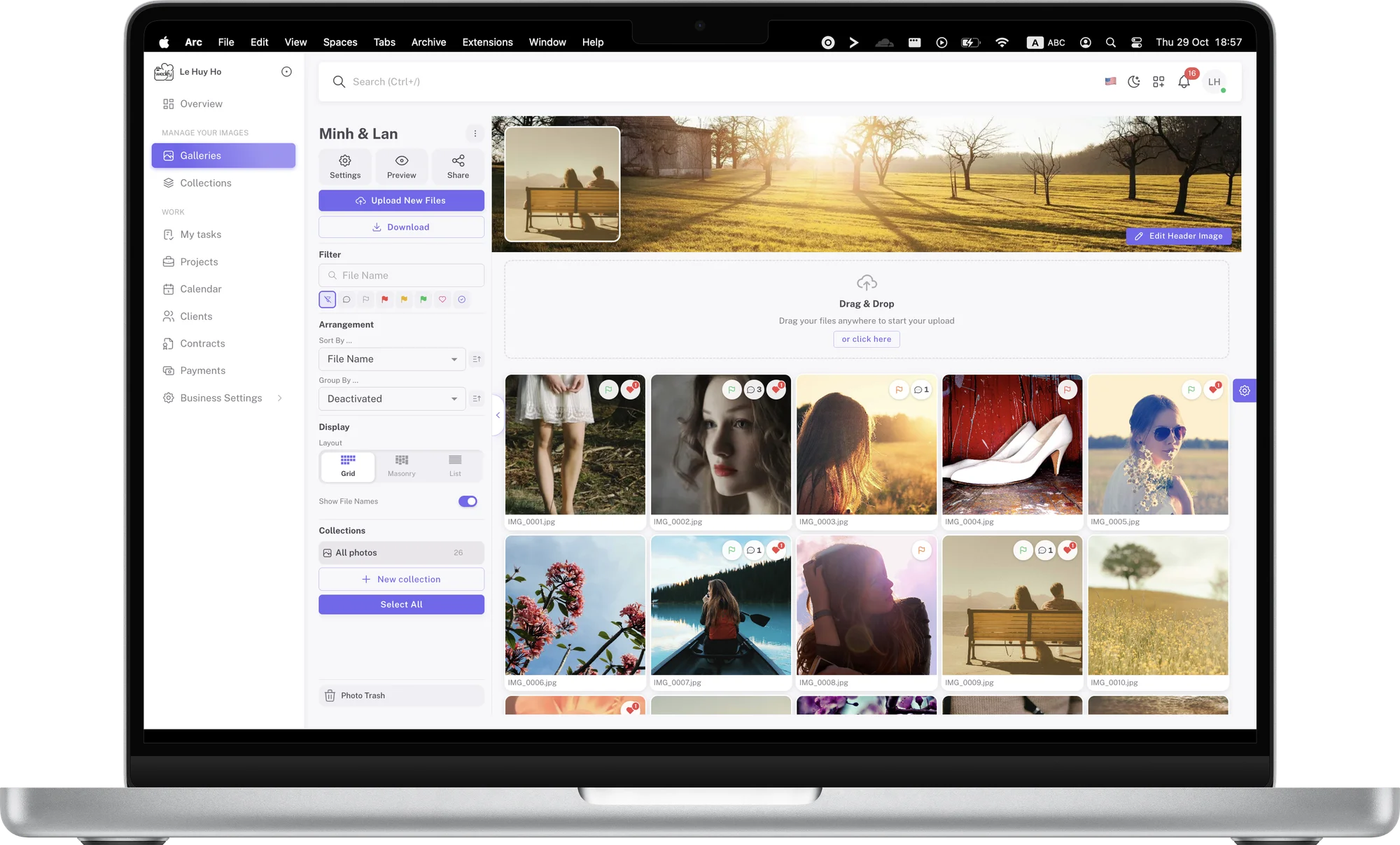
Collections keep albums tidy and easy to follow
A wedding day usually has several parts: getting ready, the ceremony, the reception and portraits. Instead of one long list of thousands of photos, split the album into collections such as Ceremony, Reception or Portraits. Clients browse part by part, and you can easily see which photos are picked and which are still pending.
A dedicated Collections page brings every set in your studio together, so you can open exactly the part you need without going through each album.
Sort, group and change the view to suit how you work
Everyone reviews photos differently. Wedify lets you sort by file name, capture time, upload time, file size or dimensions. For an overview, group photos by color flag or file type to see at a glance how many photos the client has approved and how many are still undecided.
You can also switch between three views: a grid for quick review, masonry to keep each photo’s proportions, and a list for file names and details.
Find the right photo in seconds
When a client asks for “the one where the bride laughs at the church door”, you don’t need to scroll through thousands of photos. Filters for color flags, hearts and comments narrow the list immediately, and file-name search takes you straight to the photo when you know its number.
Mark the albums you are working on as favorites so they stay at the top of the list and open in one click.
Rename, move and copy photos in bulk
Select many photos and rename them at once using your studio’s naming convention, which makes it easier to match them with the originals and to talk with clients.
When part of a shoot belongs in another album, such as family photos to send separately to the parents, simply move or copy them. Nothing is uploaded again, so it happens almost instantly.
Version history for every photo
During editing, a photo may be retouched several times based on client feedback. When you upload a new edit to replace it, Wedify keeps up to 10 earlier versions of that photo.
If the client changes their mind, open the version history, compare the versions and restore one in a single step. Comments and notes stay attached to the photo, so you never lose the context of earlier edits.
A trash bin for peace of mind
Deleted photos and albums don’t disappear immediately: they move to the trash and stay there for 14 days. During that time you can restore them exactly as they were if something was removed by mistake.
That means you can clean up old albums and unused photos with confidence, without worrying about losing a client’s important files.
An overview sheet of the whole shoot
The overview sheet shows every photo in the album as a thumbnail on a single page, with file names. It is a quick way to review a shoot before sending it, or to print it for an in-person meeting with clients at the studio.
When printing, you can also save it as a PDF and send it to clients as a summary, so they can picture the whole album before they start picking.
Export your client’s picks to your editing software
Once the client has flagged their photos, there is no need to copy file numbers by hand. Export selection creates a list of file names formatted for Lightroom Classic, Capture One, Photo Mesh, Finder or File Explorer.
Paste the list into your software’s search field and all of the client’s picks are filtered in seconds, ready for editing.
Keep track of every client response
Whenever a client comments or draws a note on a photo, you get a notification in Wedify. Clicking it opens the exact photo and the exact note, without searching through the album.
Every conversation sits next to the photo it is about, so everyone in your studio can follow progress without reading through long message threads.
Summary
Wedify is more than a way to share photos with clients: it is a tidy library for your whole studio. Photos upload reliably, are organized in collections, can be found in seconds, and are protected by version history and a trash bin.
When image management is systematic, you deliver faster, make fewer mistakes and have more time for your next shoots.
Want to see how clients pick photos with you? See collaboration mode